Check your Gmail Inbox when you are offline!

Internet Connectivity has become a lifeline of people around. So what happens when you are checking the Mail and then suddenly is it get’s disconnected then? How will you read the mail you were reading?
Gmail
Google Has managed to find out a great solution. All you need to download is Google Gears
It works like this – Whenever you are connected to the internet your
 mail is Updated but as soon as you loose the connection Gmail will auotmatically switch to offline Mode. You can do everthing in that Browser just like how you used to do it when you were online Mark Mail, Read mailm label them. All this works as Gmail Stores the Data on your Hard drive. You can even Compose a Mail, it gets stored in the outbox and will be sent as soon as you connect with the Mail server. Like it? I love it. We need this in India especially as there is no guarentee about your internet connection. Thanks Google!

Great watch which has a camera and Cellphone Capabilites!

I don’t care much about watches but i surely love this one. This one is perfect for anyone who forgets his cellphone at home or wants to use his watch to secret screenshots of his brother. It works as a Cell Phone and also works as GSM Phone!

Here’s a video. One more thing , this product will soon be up for a contest on Etiole!! This is a  MERLIN WATCH PHONE available at http://www.merlin-me.com

Create Temporary Emails to Prevent Spam from entering your Inbox

MeltMailHate Spam Mails? Want to use an email to just activate something? Or you just want an Email active for about 24 hour after which it vanishes? 

I have a tool which can help you out.MeltMail , an Email forwarding service creates temporary email which forwards all incoming mail to your desired email id for only 3 hours or 6 hours or even 24 hours (max). 
SO now you don’t ever need to worry about your privacy!

But also Please do not sign up with that email because if once the Virtual Email id vanished you will never get the emails sent to that, so use this for only when you just need on email to activate something.Using things like this is something called smartness because you are using a shield to protect your self from being spammed. Yeah! We found it! :)

Check Your Internet Connection Speed Online!

Speed.ioIf you want to figure out that either your internet Connection is to slow or you are to curious to know something than you really need to use this tool.

Speed.io is an online tool which allows you to use it to check your Download, Upload , Ping and connect speed with the Internet connection you are using. It shows all this on a Speedometer making it very easy to use. It shows additional facts like Your browser, Ip address and your internet Provider.

You need Latest FLash Player to view it in your browser. Well Go see that how fast is you internet connection speed!

Internet Connection Speed Check
It is very easy to check internet speed like this so if it is not showing the internet speed for what you had payed for then go slam your internet operator.

Post Live Videos in Google Chat and Gmail!

Google talkYes! It’s true! You can Add videos to Your Google Talk Chat. You type in a YouTube Video link and then it is converted in to the video. This feature is also available in Gmail! This makes it easy, you can view videos in the while chatting Itself!

This is something quite Cool. Google Loves adding new features and the users love using them!

Here’s a screenshot - Embed Youtube Videos in Google Chat

Most Desirable Cell Phones | You will love them all!

Cell Phones - The complete Tech Packet

Cell phones are getting complicated day by day. But to be true, I judge a cell phone more on basis of it’s looks than its Features.

Actually Cell Phones may one day replace computers , I think so , because some day cell phones may have more features than Computers! :)

I was surfing around when I saw this cool presentation made be Abbas and like it. It consist of most desirable cell phones around. Have a look at it. 

7 possible reasons why bloggers want traffic

I don’t know why all Bloggers want to increase their traffic. But i managed to find about 7 reasons Why. So check it out and tell me are they true or not? 

  • You want to make a Good income from your Blog – In case of most of bloggers, i think this is the main reason why people start blogging. I don’t Understand why? The Whole term Blogs mean a place where you can express your ideas. According to me you should use advertisemts to Cover your ISP and Domain  and hosting costs. 
  • You want to Get Popular. Yes this Is True. Many people blog to become Quite known among the Blogosphere , for Good or even Bad things.
  • You are true to your readers, you really want to share your knowledge with people all around. Incase of some people its true like KidTechGuru
  • You Want to Advertise some of your products. I know this is quite mean but thats true. Periodic posts about their product on their blog may differ them from other Good Blogs.
  • You want to bring a Change. You are sick of your problems and thats the reason why you want to Tell the worl to help you out. You need Support which you can get online. 
  • Some people are in competition. It’s True in Many cases. If you have monthly traffic of about 50,000 visitors and your rival has 60,000 your mind sets an aim for 200,000 visitors per month. That’s why people go on working till they get their gift for their hard work.

I know SEO surely increases Traffic, but to be frank Please write for humans. Always notice negative remarks about your website and try to improve it instead of deleting it. That’s how you can become a good blogger. BEST OF LUCK ALL BLOGGERS!

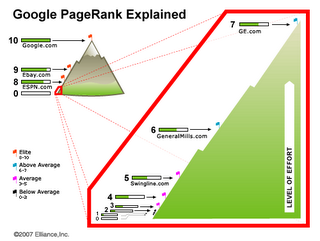
Google’s Pagerank does affect your Website Traffic

PagerankThis is for all those who are looking to get some good traffic to their blog and they think that Google’s Pagerank Does not affect their sites traffic.

I fully believe that Google’s Pagerank Does affect your Traffic indirectly because the amount of traffic you receive from Google’s Search Engine Depends on that. I can say that to you from whatIi have learn from my experience. I know its tough to believe but thats the truth. You don’t believe me? Read what i observed.

  • No of pages Indexed. When i recieved my first PR 1 i checked out my results and found that only about 230 of my pages being indexed. But after getting PR 3 i found out that about 350 pages were indexed. If you want to see how many pages are indexed just Google “site:yoursite.com”
  • And ofcourse if number of pages are increasing the you will get more traffic from search because there would be a much larger reading content for fellow serachers.
  • The Keywords for which i ranked 7th or 9th in some search results Etiole has climbed up to 4th or 5th results
  • More readers mean more traffic as if they like your blog or content they would probably post it on Social Netwroking websites or Bookmark it and then some may even blog about it and thereby giving you more links. So then your PR may increase again. 
  • All this may or may not be true. This is what i have observed. 

Well If you have a experience to speak about be sure to post it in the comments and if it’s got the power than we will also post about it on our blog.

Create Your Own Social Networking Website in 90 minutes just like Facebook [Updated]

Social Networking

*Update 2: The updated article is up here : How to Create a Social Networking Website like Facebook in Ten minutes : Step by Step Tutorial*

*Update 1: This Current Post may be outdated because newer version of softwares have been released. Subscribe our blog on Email or RSS Feed because we are going to post a new updated step by step tutorial*

Yes. I am not joking! You can make a social networking very easily! Its very simple! Follow my simple steps and then you are another Mark Zuckerberg! One extra feature will also be there that your users can create their own blogs too! The best thing is that you can even make some good money out of it by monetizing it with Adsense!

Here’s what you need to do.

1.  Buy some hosting Space with Php enabled and  database support or use a free hosting like tyreus.com.
2. This step is the most important. You need to download WordPress Mu from mu.wordpress.org and after you do that extract the components in your hosting panel. You need to install it on your web-server. read my post on How to install WordPress Mu.
3. After having intalled it’s time to make the real thing. Go to www.buddypress.org and download buddypress combo.
4. After downloading it now go to your host control panel and got to file manager or if you use ftp it will be much easier. Now having logged in go to WordPress installtion folder >> WP content >> Mu-Plugins >> and then upload all the files except the BUddypress theme. Now extract the contents.
5. Now go to WordPress installtion folder >> WP content >> Themes >> and upload the Buddypress theme over there. But wait more’s left. Now after doing it extract the files and open the file. You will file two folders. One with BUddypress- theme and other member theme. Now move the member themes to Wp-Content folder. Now login as administrator.
6. Go to site Admin and keep registrations on. Thats it! You have made it!
7. But how to get traffic? Heres a list of my posts which will surely help you create a huge user base within short time (i did it in 6 months – PR 0 to PR 3!)
8. See a Example – Check out my social Networking website at Techezines.com