How to Create a Social Networking Website like Facebook in Ten minutes : Step by Step Tutorial

This is a quick step by step tutorial of how to make a Social Networking Website like Facebook in TEN Minutes. (This is an Updated tutorial version of the past one)

Step 1.) To Begin with, you need to have a web hosting account. You can get a free hosting account (list of free web hosts) but the problem with these hosts is that they have forced ads or bad uptime or unnecessary stuff required. Make sure the free host gives you FTP access and at least one MySQL Database and PHP support. I recommend you to buy a HostGator hosting account to begin with as it has all things required. Their Hatchling plan is superbly cheap (less than $4 a month) and use a coupon for more discount.

Step 2.) Get a domain too if you’ve bought hosting and configure domain with the hosting account. After all that has been done you will have to install WordPress. There are many ways of installing WordPress. If you’ve got Cpanel, then you can install WordPress with one click installer. If not, you will have to manually do that. Here’s how to do that too. Make sure you install that in the root directory of your hosting account.

Step 3.) After you have done that, you will have to log into your WordPress Blog. Now go to Plugins >> Add New. Type in “BuddyPress” and install that plugin. If you want to manually install it, here’s the link to the plugin.

Step 4.) Activate the Plugin.

Step 5.) Now go to Manage Themes and activate the Buddypress Default Theme.

Step 6.) You’re half way through. Now Few more things and you are there! On your WordPress Dashboard, go to General Settings and tick mark Anyone can Register option.

Step 7.) Now go to Profile Field setup and add the fields to be filled by users when signing up (stuff like Age, Website, Gender, Interests, bla bla).

Step 8.) You’ve got loads of features already. If you want to add more features like Photo Albums, Videos, Chat, you can install plugins to do that. (Here’s a complete list).

Step 9.) If you are annoyed with the current design, you can use a new theme to match your Social Network. A full list of Buddypress Compatible themes.

Step 10.) All set to go! An Example of a working website is testbp.org. You have made something like this!

If you find this difficult, you can mail the author for help or get a full fledged working social network with full support for a affordable price within 24 hours. [Contact : monik[at]etiole[dot]com]

Customize Facebook Profile Page with few clicks and pictures

Customize your profile page to the best! Here’s one way you can do it.

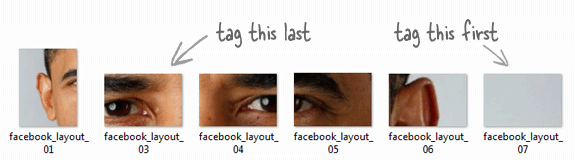
The New Layout provided by Facebook can accommodate 6 images .. lets get somewhat creative and try it on our Profile.

Customized Profile

So Friends are you Excited to make your Facebook profile page like this ?

These are Simple steps given Below :-

Basically there are two methods to construct such profile Page

1) Manual Method
2) Automated Method

1) Manual Method :- Manual method is off course a hard method to implement in which we will have to take number of dimensions and cutting !! Its is somewhat complicated one . . we will Use the Automated method

Manual Method

After cropping the image we will have to Tag it in specified manner . . This job is very tedious . .

Tagging !

2) Automated Method :- This method is very simple to use ..

a) All you need to do is, just click on this link (http://apps.facebook.com/profile-maker/?ref=bookmarks&count=0 )
b) Select the Image you wanna use in your profile.
c) Finally arrange it according to your need.
d) Click on Create Profile.
e) Follow steps
f) Done.


Creative Comes Up With Its Own Ziio Tablet In India

Indeed, Creative is a master in music devices. Now it has launched its own Ziio Tablet in India. This has 2 models of 7 inch and 10 inch. Yes, you it runs on Android too, as almost all of the tablets released in 2011. The 7-inch resistive touchscreen model supports 480×800 pixel resolution while the 10-inch touchscreen model supports 1024×600 pixel resolution.

Features Breakdown :

  • 7 inch and 10 inch models.
  • Android 2.2 Operating System
  • Bluetooth
  • Wi-Fi
  • X-Fi Audio enhancements
  • Audio Supported
  • Video Supported
  • HD-Video Out
  • Photo Supported
  • Front Facing Camera
  • In built Microphone
  • In built speaker
  • Accelerometer
  • 25 hrs battery life
  • 400g in weight

iPhone App by 17 yr old reaches iTunes Top Spot

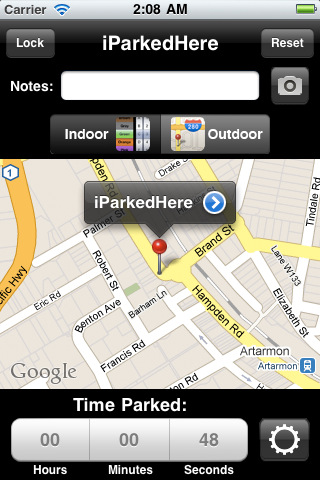
Brandon Cowan, an Australian teen has developed an iPhone app, iParkedHere that helps users to mark the location where they have parked their car and it also remembers the parking time left for you. The idea is not so great but the amazing part is that it’s No. 1 grossing app in the lifestyle category on iTunes!

The developer is 17 and had made the app with his friend. The Application is available at a price of $1.99 and has created much buzz in the Australian App store.

The Aussie developer said, “At the moment we are keeping the money in the company but I will probably be saving it for a house when I’m older” He also said that their company “Crazy Dogs Apps”, last week signed an agreement with a Gaming firm to develop an app for it. He’s obviously made much more than $100,000 with this app!

Kids taking over the App Store?

Angry Birds Rio Hits 10 Million Downloads on Handheld devices In 10 Days

Angry Bird Rio

Quite Expected? Angry Bird Rio has hit 10 Million Downloads on Apple’s App store for iPhone and iPad  and Google’s Android Running Phones.

Angry Bird Rio is popularly known as a mobile game and now we are just days away from its Animated Movie Version which is called Rio. The game will receive a minimum of 4 updates this year.

Logitech Steps In Competition with M325 Wireless Mouse

Greater Precision

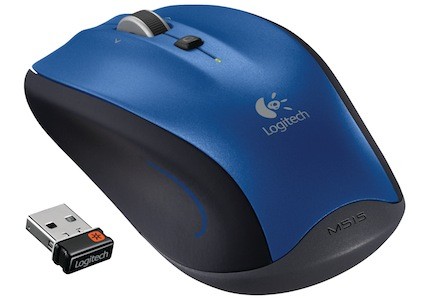
Logitech announced wireless mouse M325 to their lineup. It aims at better online navigation, comfort, control and better precision which promises long durability and freshness even after long usage hours.

It has a good shape and a “claw” rubber grip which promises awesome handling. It has a micro-precise scroll wheel which is specially designed for net browsing which has 4 times sensitive browsing compared to existing mouses.

Standard Mice has about 18-24 stripes-like design on the scroll but this mice rocks some 72 of them. It has a freakin’ battery that extends upto 18 months. Available for $40. Competition to Razer’s Abyssus?

Steve Jobs wanted to create tablets ever since Apple’s Inception : Steve Wozniak

Sometimes, I feel sad because Steve Jobs takes all the limelight. Not just once, ever since. Always. Steve Wozniak, the infamous co-founder of Apple willingly takes the backseat.

Years after his leave at Apple, at a keynote on Storage Networking World in Santa Clara, California he was questioned as how tablets could change the computer industry. I expected some sort of answer and he fulfilled my wish. He compared them to TV’s.

Moreover he called them, “It’s for the normal people in the world”.

I think Steve Jobs had that intention from the day we started Apple, but it was just hard to get there, because we had to go through a lot of steps where you connected to things, and (eventually) computers grew up to where they could do … normal consumer appliance things

He even expressed his desire that Android tablets shall never surpass iPads. Why? Ofcourse, somehow the technology that powers iPad is the highly evolved version of the technology that Steve Wozniak had designed in 1980.

The question that bugs most of people who follow Apple is that, Why did Wozniak ever leave Apple? Steve Jobs and Wozniak had different vision for the company. Wozniak was inclined towards the engineering side while Jobs was interested in running a business and a company. [Source]

Gmail Motion transformed into reality : Uses Kinect to sense gestures

I don’t know why but i was kinda’ expecting this from our engineers. Google’s April Fool trick Gmail Motion was stupid. Obviously, you cannot use motion sensing without a device to actually sense it. They didn’t mention any device for it.

Anyway, check out the video after break. You’ll be not-so-stunned when Gmail’s spoof was turned into reality by ICT’s MxR using a laptop, some code and a Microsoft Kinect.

And here’s actual Gmail Motion Spoof Video.

Windows 8 welcome screen leaked : looks hot and promising

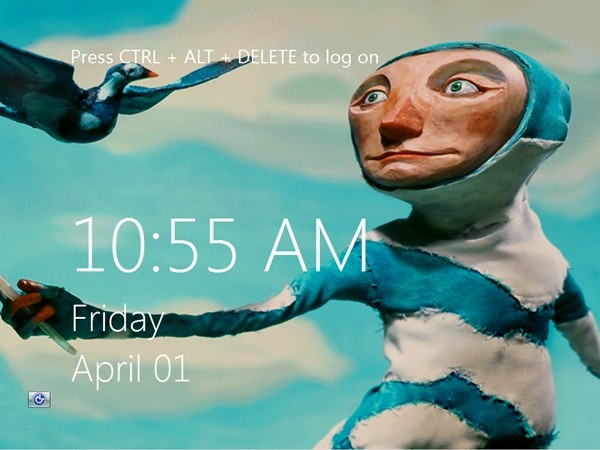
Windows 8 Welcome Screen leaked screenshot after break. How is it? (Click to enlarge)

Doesn’t it resemble something? Somewhat like Windows Phone 7 Metro User Interface. Background image can obviously be customized. CTRL + ALT + DELETE seems obvious option to log in but there will be more options like clicking the image and logging in.

For Tablet versions, Windows 8 unlocking would be done by swiping a pattern on the skin. Thanks DownloadSquad.