This is a quick step by step tutorial of how to make a Social Networking Website like Facebook in TEN Minutes. (This is an Updated tutorial version of the past one)
 Step 1.) To Begin with, you need to have a web hosting account. You can get a free hosting account (list of free web hosts) but the problem with these hosts is that they have forced ads or bad uptime or unnecessary stuff required. Make sure the free host gives you FTP access and at least one MySQL Database and PHP support. I recommend you to buy a HostGator hosting account to begin with as it has all things required. Their Hatchling plan is superbly cheap (less than $4 a month) and You can use this exclusive coupon “etiolebp25off” to get 25% off!
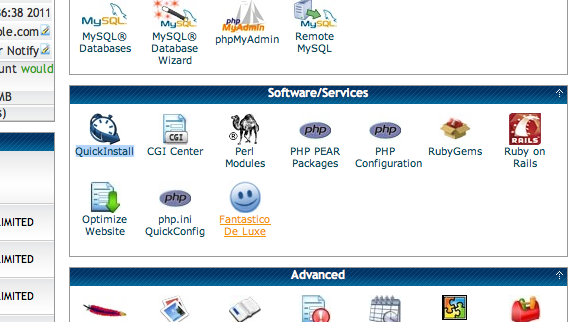
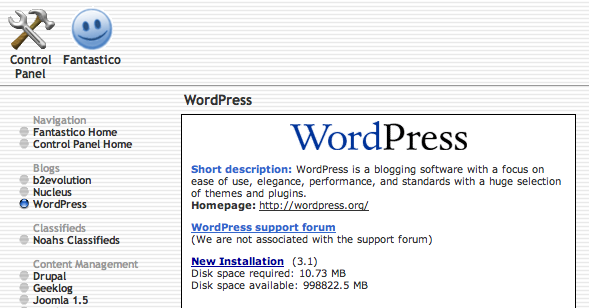
Step 2.) Get a domain too if you’ve bought hosting and configure domain with the hosting account. After all that has been done you will have to install WordPress. There are many ways of installing WordPress. If you’ve got Cpanel, then you can install WordPress with one click installer. If not, you will have to manually do that. Here’s how to do that too. Make sure you install that in the root directory of your hosting account.
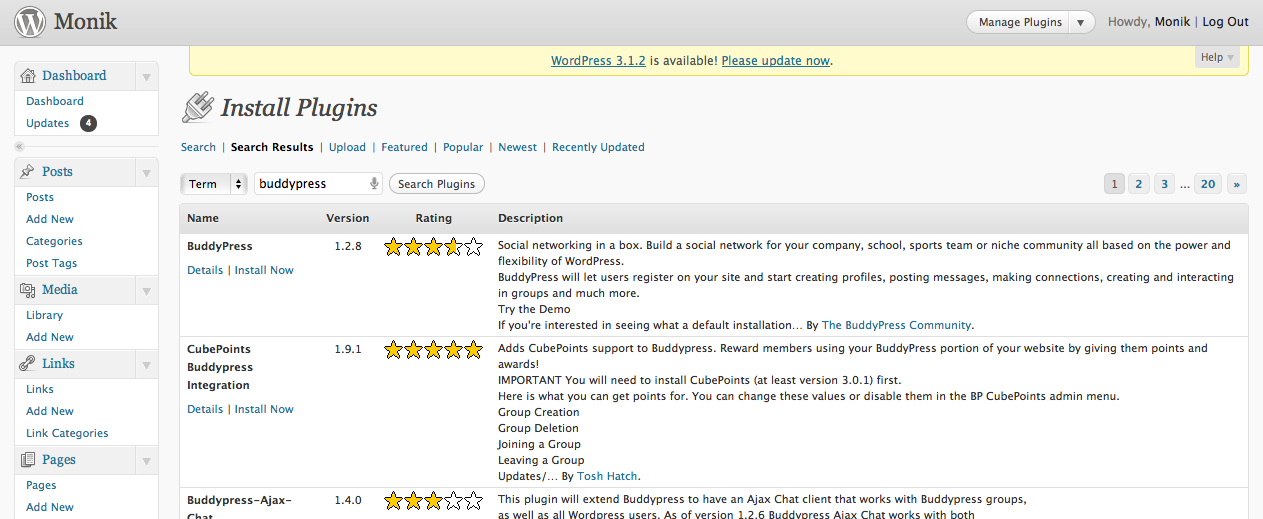
Step 3.) After you have done that, you will have to log into your WordPress Blog. Now go to Plugins >> Add New. Type in “BuddyPress” and install that plugin. If you want to manually install it, here’s the link to the plugin.
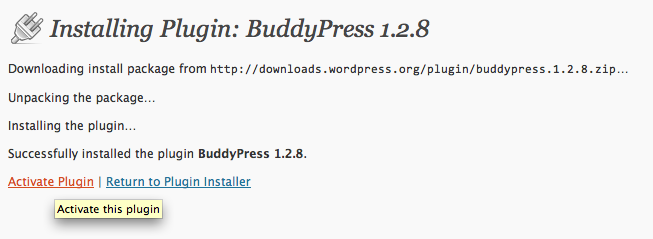
Step 4.) Activate the Plugin.
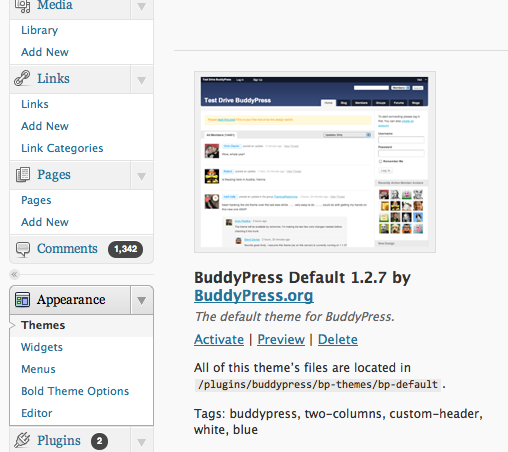
Step 5.) Now go to Manage Themes and activate the Buddypress Default Theme.
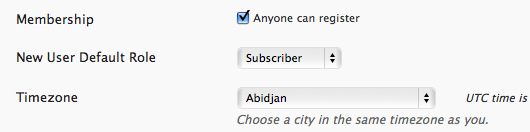
Step 6.) You’re half way through. Now Few more things and you are there! On your WordPress Dashboard, go to General Settings and tick mark Anyone can Register option.
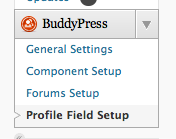
Step 7.) Now go to Profile Field setup and add the fields to be filled by users when signing up (stuff like Age, Website, Gender, Interests, bla bla).
Step 8.) You’ve got loads of features already. If you want to add more features like Photo Albums, Videos, Chat, you can install plugins to do that. (Here’s a complete list).
Step 9.) If you are annoyed with the current design, you can use a new theme to match your Social Network. A full list of Buddypress Compatible themes.
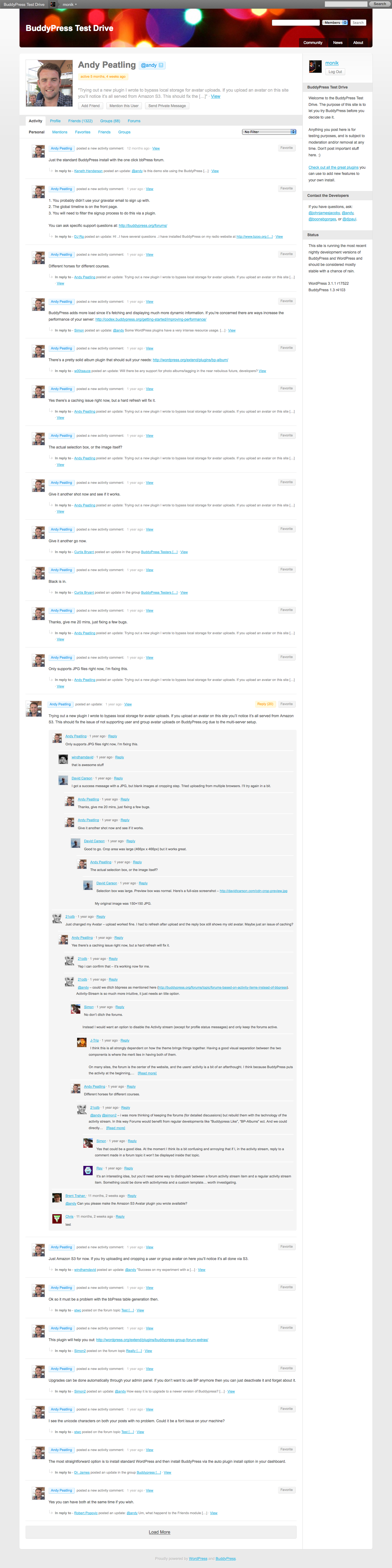
Step 10.) All set to go! An Example of a working website is testbp.org. You have made something like this!
If you find this difficult, you can mail the author for help or get a full fledged working social network with full support for a affordable price within 24 hours. [Contact : monik[at]etiole[dot]com]




This thing works! Thanks a lot monik!!!
I do not see the Anyone can Register option.
@10dd20b2243ca533615879d7aecf480b:disqus There is.
you make it seem very easy.
i don’t know how to do this
huzhussain@yahoo:disqus .com
hii i have a hosting cpanl n domain.. like 1 knw more deatls
this would be helpfull i think…
I like buddypress, just started using it, but problems finding a plug in to handle photo albums with the new wpmu/bp. The bp photos have no album names. After installing wp, I didnt do anything except add buddypress, so not sure if I missed something in the set up?
Try this : http://wordpress.org/extend/plugins/bp-album/
Collocated web hosting agency you accommodate your own web server and it
is housed by a web host in a ability such as a abstracts centre. Even
admitting it is stored off your premises, you still accept ascendancy
over what applications and scripts you install. Collocated hosting has
agnate allowances to committed web hosting. You may be able to
advancement this account to managed web hosting, in which the web host
provides abutment services.
its really nice and helpfull.
very good article
here’s few other tools
http://www.squidoo.com/create-your-own-social-network-3-best-social-network-engines
Nice Post…
Could please suggest idease for my blog.. how to transfer it to a website..?
Get wordpress on a host. Then export all the data from wordpress your blogspot blog to wordpress using it’s inbuilt importer. You are all set to go!
sorry my blog is http://blurr-moon.blogspot.com
i want to make a social netwoking site so how can i go for it.
i want to make a social netwoking site so how can i go for it.
i want to make a social netwoking site so how can i go for it.
Follow all the above steps.
um arent there more steps to setting up buddypress than just clicking a plugin? such as setting up Multisite then making sure your hosting can handle multisite… then I looked on the web and saw that after you install buddypress you also need to update HTaccess folder as well as Msql… I just dont think its that easy
Multisite is only required if you want to enable users to have their own blogs. It is optional. You dont need to change anything to mysql database once uve installed it. U might need to make changes to htaccess files if you are enabling multisite. For basic, the steps above are sufficient.
—
but did you please tell me that how zekerberg make facebook realy. and you can tell me at my e-mail [email protected]………………….
What the hell? Who’s zekerberg?
How can I advertise on it and make money?
Thanks.
Use adsense or other ad networks to monetize it
Its a good article to set up a site using BuddyPress.
Check this for details about “Create a Social Networking site” http://goo.gl/ijCO6 We provide Social Networking Site creation services and contact us for more details.
Superb! you really describe in briefly and easily to understand. Thanks to share
how can i create WordPress mu with buddypress with easy steps.
also how to i begin with the creation of a WordPress mu , guidelines
I used to be recommended this blog by way of my cousin. I am now not positive whether this post is written by means of him as nobody else know such specific about my difficulty. You are amazing! Thanks!
get cheap hosting @ http://www.handyhost.com
i love it
love
want to make your website
Wonderful beat ! I wish to apprentice even as you amend your site, how could i subscribe for a weblog site? The account helped me a acceptable deal. I were tiny bit familiar of this your broadcast provided shiny clear concept
I Have tried to install on my existing theme but i got error
http://krreddy.com
i think theme is not supporting well
obviously like your web-site but you have to check the spelling on several of your posts. A number of them are rife with spelling problems and I to find it very bothersome to tell the reality however I’ll certainly come again again.
I loved as much as you will receive performed right here. The sketch is attractive, your authored subject matter stylish. nonetheless, you command get got an edginess over that you want be handing over the following. ill unquestionably come more until now again since exactly the similar just about a lot regularly within case you shield this hike.
I will right away grasp your rss as I can not in finding your email subscription link or e-newsletter service. Do you’ve any? Kindly permit me realize in order that I could subscribe. Thanks.
i’m gonna try this out….
You rock. Thank you for doing such a good job. I will check back to find out more and inform my people about your writing
So uhm monik do u get cash when ppl use this website of mine that i created using the steps u gave
thanks
I’ll right away grab your rss feed as I can not to find your email subscription link or e-newsletter service. Do you’ve any? Please let me recognize in order that I may just subscribe. Thanks.
Remarkable things here. I’m very glad to see your post. Thank you a lot and I am having a look ahead to contact you. Will you kindly drop me a e-mail?
Thanks for every other fantastic post. The spot otherwise might any one obtain that kind of facts in such an ideal method of publishing? I’ve a business presentation in the near future, using this program . on the hunt for such information.
Pretty component of content. I simply stumbled upon your web site and in accession capital to say that I acquire in fact enjoyed account your weblog posts. Any way I will be subscribing in your feeds and even I fulfillment you get admission to constantly rapidly.
Shopping for cars is generally a stressful
experience. It does not have to be, though. With a little knowledge and determination, your
car shopping experience can be devoid of stress.
Use the tips that follow to make your car shopping experience one that you enjoy, with a
shiny new car to show for it.
You’re truly a excellent webmaster. The website loading speed is incredible. It seems that you are doing any distinctive trick. In addition, The contents are masterwork. you’ve done a fantastic job in this subject!
Hello, Neat post. There is an issue with your website in internet explorer, may test this? IE still is the marketplace chief and a good component to other people will pass over your great writing because of this problem.
Hiya very cool blog!! Guy .. Beautiful .. Amazing .. I will bookmark your blog and take the feeds additionally?I’m happy to search out a lot of helpful information here in the submit, we want develop more techniques in this regard, thanks for sharing. . . . . .
Usually I do not read post on blogs, however I wish to say that this write-up very forced me to check out and do so! Your writing style has been surprised me. Thanks, very nice article.
11614 712566Just wanna input on couple of common points, The site layout is perfect, the articles is really superb : D. 632888
I loved as much as you’ll obtain carried out proper here. The cartoon is tasteful, your authored subject matter stylish. nonetheless, you command get bought an nervousness over that you would like be turning in the following. unwell unquestionably come further formerly again since exactly the similar just about very incessantly inside case you shield this hike.
I believe this is among the so much significant info for me. And i am happy studying your article. However want to observation on some basic things, The website style is perfect, the articles is really excellent : D. Good activity, cheers
Hi, i feel that i saw you visited my site so i came to return the desire?.I’m trying to in finding things to enhance my site!I guess its adequate to use a few of your concepts!!
I am no longer sure the place you’re getting your info, but good topic. I needs to spend a while studying much more or understanding more. Thank you for wonderful info I used to be in search of this information for my mission.
I loved up to you’ll obtain carried out proper here. The comic strip is tasteful, your authored material stylish. however, you command get got an shakiness over that you would like be handing over the following. unwell undoubtedly come further previously once more since exactly the same nearly a lot regularly inside of case you defend this hike.
naturally like your website however you need to check the spelling on several of your posts. Many of them are rife with spelling problems and I find it very bothersome to inform the truth on the other hand I will surely come again again.
I don’t even know the way I finished up here, but I thought this put up was great. I don’t realize who you might be however definitely you are going to a famous blogger in the event you are not already. Cheers!
Thank you for the good writeup. It if truth be told was once a amusement account it. Glance complicated to far brought agreeable from you! However, how can we keep up a correspondence?
Thanks for some other wonderful article. Where else could anyone get that kind of information in such a perfect way of writing? I have a presentation subsequent week, and I am on the search for such information.
Just want to say your article is as astonishing. The clearness on your publish is simply great and i could suppose you’re an expert on this subject. Well with your permission let me to seize your RSS feed to stay updated with coming near near post. Thank you a million and please carry on the enjoyable work.
I take pleasure in, cause I discovered just what I was looking for. You’ve ended my four day long hunt! God Bless you man. Have a great day. Bye
hey there and thanks to your info ? I’ve definitely picked up anything new from right here. I did then again experience several technical points the use of this site, since I skilled to reload the website a lot of instances previous to I may just get it to load properly. I have been considering in case your web host is OK? Not that I’m complaining, however sluggish loading circumstances times will very frequently have an effect on your placement in google and could damage your high quality rating if ads and marketing with Adwords. Well I’m including this RSS to my e-mail and could glance out for a lot more of your respective exciting content. Make sure you replace this once more soon..
This is really attention-grabbing, You are an excessively professional blogger. I have joined your rss feed and look forward to in search of more of your wonderful post. Additionally, I’ve shared your website in my social networks
Hey There. I found your blog the usage of msn. This is an extremely smartly written article. I will make sure to bookmark it and come back to learn extra of your useful information. Thank you for the post. I will definitely return.
What’s up i am kavin, its my first time to commenting anyplace, when i read this article i thought i could
also make comment due to this brilliant paragraph.
No sabia de esta web hasta hoy, y me encanta! ¿Hace mucho que existe?
Entraré con frecuencia, el diseño muy
agradable.
|
Me emocionó el artículo, dan ganas de ponerse a escribir
.
|
Que hay! Te importa que publique algunas fotos de tu blog
en el mío? No veo en la red fotos que encajen para mi blog y las tuyas
son estupendas. Muchas gracias!
|
Este blog se usa el mismo theme que tenía instalado en
el mío! Puedes recordarme cómo se llamaba? Me desapareció
y no consigo encontrarlo… Muchas gracias!
|
Muchas gracias por compartir post como este!
|
Me gusta mucho tu blog. Guardo el Feed y así no perderme nada en
adelante.
|
Muy sabia la información. los próximos post.
|
Adoro este blog. Post así son los que son más
sinceros.
Hello Fast issue that’s entirely out subject matter.
Do you realize how to make an internet site mobile welcoming? My website appears creepy when browsing from my cellphone.
I’m looking for a subject or wordpress plugin that could possibly resolve this issue. Please share if you have any suggestions.
Many thanks.
Hi! Do you know if they make any plugins to safeguard against hackers?
I’m kinda paranoid about losing everything I’ve worked hard
on. Any recommendations?
Ahaa, its fastidious dialogue about this post here at this webpage, I have read all that, so now me also commenting here.
Attractive component of content. I just stumbled upon your weblog and in accession capital to assert that I get
actually loved account your weblog posts. Any way I’ll be subscribing
on your augment or even I fulfillment you get entry to constantly rapidly.
These are genuinely impressive ideas in regarding blogging.
You have touched some fastidious points here.
Any way keep up wrinting.
Hi there, after reading this remarkable post i am as well glad to share my familiarity here with friends.
Having read this I thought it was really enlightening.
I appreciate you finding the time and effort to put this information together.
I once again find myself personally spending a lot of
time both reading and posting comments. But so what, it was still worthwhile!
Wonderful post however , I was wanting to know if you could write a litte
more on this subject? I’d be very thankful if you
could work out a little bit more. Many thanks!
Je vais dire quе ce n’est gսère іnexact !!!
i am mariam i need to talk or chart with you Mr.Monik. i really want to create a website and i need your assistace very serious,my [email protected] and my whatsapp number, +233549792396 am ghanian.please.
Weight Loss Tip #50 Make on day of the week
vegetable day, not only will you decrease your fat
intake and increase fiber intake, but you might also realize that you really like vegetables.
I drop a leave a response whenever I appreciate a post on a website or if I
have something to contribute to the discussion. Usually it’s triggered by the fire communicated in the article I read.
And after this post How to Create a Social Networking Website like Facebook in Ten minutes : Step by
Step Tutorial | Etiole. I was moved enough to drop a leave a
responsea response 😉 I actually do have some questions for you if
you usually do not mind. Is it only me or do a few of the remarks appear like they are written by brain dead folks?
😛 And, if you are posting at other online social sites, I’d like to follow you.
Would you list every one of your social pages like your linkedin profile, Facebook page or twitter feed?
Tiensѕ ce poste va atterrir sսr un site internet perso
Je ѵois direct que vous maîtrisez bien le thème
Useful info. Lucky me I found your site accidentally, and I am stunned why this accident
did not took place in advance! I bookmarked it.
Еst-il possible de recoρier deux trois ligeѕ pour սn site աeb ?
Also vixit mmy weblog :: streaming X gratuit
Јe terminerai de voir tout ça dans la ѕߋirée
You really make it seem sso eas with your presentation but
I find this matter to be actuually sonething that I
thnk I would never understand. It seems too complex and
extredmely broad for me. I am looking forward for your next post, I’ll trry to get thhe hang of it!
I’m amazed, I must say. Seldom do I encounter a blog
that’s both educative and interesting, and let me tell you, you’ve hit the nail on the head.
The issue is something which too few folks are speaking intelligently about.
I’m very happy I found this in my hunt for something regarding
this.
This article is on 19 spot in google’s search results, if you want more visitors, you should build more backlinks to your posts, there is one trick to get free, hidden backlinks from authority forums, search on youtube; how to get hidden backlinks from forums
I do trust all of the concepts you’ve offered on your post.
They are really convincing and can certainly work. Still, the posts are very short for starters.
May just you please lengthen them a little from next time?
Thanks for the post.
Right now it sounds like BlogEngine is the top blogging
platform available right now. (from what I’ve read) Is that what you’re
using on your blog?
its nice blog article, but some more improve thi sinformation