Complete list of Run Commands for Windows (Includes some unusual Commands)

Now this list that am going to ‘re-produce’[pun unintended] here is interesting in the sense that it can work wonders with anyone of us using Windows,most of us being doing so.In case you have got stuck to some un-indentifying (well,apparently,to you) problems which you are not being able to undrown from,this is the right thing for you.You just turn your face to these commands that can act as way-givers and savers in your bad computing days!

Well, here it goes.I will be producing a list of the run commands in an alphabetical order to execute the various programs in the windows operating system installed in our computers..

RUN commands for windows:

START >> RUN

Accessibility Controls-  access.cpl

Add Hardware Wizard- hdwwiz.cpl

Add/Remove Programs-  appwiz.cpl

Administrative Tools-  control.exe admintools

Automatic Updates-  wuaucpl.cpl

Bluetooth Transfer Wizard-  fsquirt

Calculator-  calc

Certificate Manager-  certmgr.msc

Character Map-  charmap

Check Disk Utility-  chkdsk

Clipboard Viewer-  clipbrd

Command Prompt-  cmd

Component Services-  dcomcnfg

Computer Management-  compmgmt.msc

Date and Time Properties-  timedate.cpl

DDE Shares-  ddeshare

Device Manager- devmgmt.msc

Direct X Control Panel (if installed)- directx.cpl

Direct X Troubleshooter-  dxdiag

Disk Cleanup Utility-  cleanmgr

Disk Defragment-  dfrg.msc

Disk Management-   diskmgmt.msc

Disk Partition Manager-  diskpart

Display Properties-  control.exe

Desktop display Properties-  desk.cpl

Display Properties (w/Appearance Tab Preselected)- control.exe color

Dr. Watson System Troubleshooting Utility-  drwtsn32

Driver Verifier Utility-  verifier

Event Viewer-  eventvwr.msc

File Signature Verification Tool-  sigverif

Findfast-  findfast.cpl

Folders Properties-  control.exe folders

Fonts-  control.exe fonts

Fonts Folder-  fonts

Free Cell Card Game-  freecell

Game Controllers-  joy.cpl

Group Policy Editor (XP Prof)- gpedit.msc

Hearts Card Game-  mshearts

Iexpress Wizard-  iexpress

Indexing Service-  ciadv.msc

Internet Properties-  inetcpl.cpl

Java Control Panel (if installed)- jpicpl32.cpl

Java Control Panel (if installed)-  javaws

Keyboard Properties-  control.exe keyboard

Local Security Settings-  secpol.msc

Local Users and Groups-  lusrmgr.msc

Logs You Out Of Windows-  logoff

Microsoft Chat-  winchat

Minesweeper Game-  winmine

Mouse Properties-  control.exe mouse

Mouse Properties-  main.cpl

Network Connections-  control.exe netconnections

Network Connections-  ncpa.cpl

Network Setup Wizard-  netsetup.cpl

Nview Desktop Manager (if installed)- nvtuicpl.cpl

Object Packager-  packager

ODBC Data Source Administrator-  odbccp32.cpl

On Screen Keyboard-  osk

Opens AC3 Filter (if installed)- ac3filter.cpl

Password Properties-  password.cpl

Performance Monitor-  perfmon.msc

Performance Monitor- perfmon

Phone and Modem Options-  telephon.cpl

Power Configuration-  powercfg.cpl

Printers and Faxes-  control.exe printers

Printers Folder-  printers

Private Character Editor-  eudcedit

Quicktime (If Installed)-  QuickTime.cpl

Regional Settings-  intl.cpl

Registry Editor-  regedit

Registry Editor-  regedit32

Removable Storage-  ntmsmgr.msc

Removable Storage Operator Requests-  ntmsoprq.msc

Resultant Set of Policy-  rsop.msc

Resultant Set of Policy (XP Prof)- rsop.msc

Scanners and Cameras-  sticpl.cpl

Scheduled Tasks-  control.exe schedtasks

Security Center- wscui.cpl

Services-  services.msc

Shared Folders-  fsmgmt.msc

Shuts Down Windows-  shutdown

Sounds and Audio-  mmsys.cpl

Spider Solitare Card Game-  spider

SQL Client Configuration-  cliconfg

System Configuration Editor-  sysedit

System Configuration Utility-  msconfig

System File Checker Utility-  sfc

System Properties-  sysdm.cpl

Task Manager-  taskmgr

Telnet Client- telnet

User Account Management-  nusrmgr.cpl

Utility Manager-  utilman

Windows Firewall-  firewall.cpl

Windows Magnifier-  magnify

Windows Management Infrastructure-  wmimgmt.msc

Windows System Security Tool- syskey

Windows Update Launches-  wupdmgr

Windows XP Tour Wizard-  tourstart

Wordpad-  write

All these commands really have helped me a lot to set up the tiny tit-bits of my machine,and also to set-up previously unexplored agendas..

I would like to have all of you have the same experiences of happy computing,and for that you now know where to hit upon…

So,tech it easy!

Windows 7 : Get some Cool Ringtones for your Cell Phone!

After the craze with Bing tones few days back, here Windows 7 also have come up with ringtones for you to have the feel of the Operating system while on the go.

For the people who admire Windows 7 OS very much, Long Zheng has produced the OS tones in a format that you can use to play as ring tones on your mobile phone.

The tones are in 2 formats: MP3 for everyone using MP3 compatible phones and m4r for the iPhone users. Some of the tones are really great but that is a personal choice.

Download the Windows 7 Ring Tones here.

Robocop : The next virtual cop!

Normally the Japanese are known for tremendous game shows,Tech-savvy gadget and stuffs and drunken karaoke.But now, adding to that extremely distinguished list, is their very own robocop.

The new robocop, codenamed T-34, has recently been unveiled by Tmusk Co. and Alacom Co. for use by police agencies and larger companies that need better nighttime surveillance. It is going to suppliment the cops during the night vigilences,and it can move at 60mph and throw nets at the suspected burglers like spiderman.The T-34 can move at a blazing 6 MPH and will be controlled by a security guard on a remote control or a cell phone interface designed by the firms. Real time images of what the robot sees will be transmitted to the operator, even on their cell phone.

The robot’s means of taking out would-be intruders consists of throwing a net at them to subdue them. The robot’s extremely quiet nature makes it good for sneaking up on crooks.

Currently, no plans exist to bring the T-34 to the U.S.

Zune HD : The Perfect iPod Touch Killer
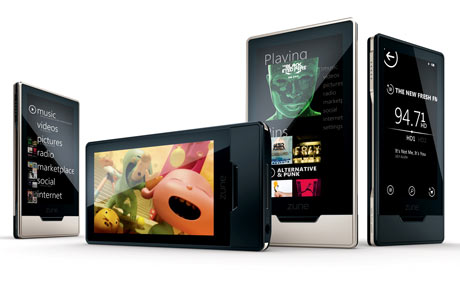
Microsoft has started to get things right, especially with the Launch of Bing and Windows 7. Now, if Zune HD also makes it, then probably Microsoft will continue to win!

iPod Touch users and iPod Lovers were Pretty unhappy about the fact that Camera Wasn’t added to iPod Touch and this being the right time for Microsoft to get in Consumers for their Product! Apart from that, not just timing but the features, Interface and looks also appeal to users.

I would also love to get a hands-on Review on Zune HD but unfortunately it isn’t available in India, and i hope it will be available soon! But Zune HD seems to be getting many positive responses from the Blogosphere, i think it will be the same from users. As far as i have seen videos and read reviews people have already started claiming Zune HD as iPod Touch Killer!

Zune HD has OLEDs which instead of having those mounted lights at the back, they emit their own light. Along with that, it has the HD Radio Capability where you can get Crystal Clear Clarity while listening to HD Radios.zune_hd

The interface seems to rock. Next, the Marketplace is rival to Apple’s iTunes Store. Although many Apps have not been developed and also the marketplace is also not open to developers worldwide like Apple’s App store but to certain Publishers with which Zune is working. HopeFully, Developers might get access to it, next year. Some Games are also available for free of cost now.

Looks are also one more factor affecting sales of any Product. I know many people, who go on for iPod Nano and not iPod Touch because according to the “iPod Nano is More Good Looking than iPod Touch”, and most can’t deny the fact because of the awesome colors it’s available in. Zune HD is not available in Many Colors but it still has got stunning looks!

It Sells for $220 with a 16 Gb Memory Storage whereas Apple’s iPod Touch Starts at 8gb with a Price of $199.

Here’s a Zune HD User Interface tour by CrunchGear. (We hope to give out our very soon!)

Microsoft Getting Better and Better with their Ad Campaigns!

When Apple is busy making advertisements which seem to Bring out Hatred towards PC’s, Windows is Busy working on their Advertising Campaign for Windows 7. 

As Days Pass, Microsoft is getting better and better with their Marketing Campaigns this time. Last one was Office 2010 Ad, and how can we forget, The Laptop Hunters Ad!

In this Commercial for Windows 7, a girl named Kylie is quite amazed with “7″ being all over her Computer. She, then decides to make out a presentation out of it with “Happy” Pictures like a Pony Picture, lol. Video After Break.

Apple’s Tablet PC : Taiwan Manufacturers lucky to tap Supplies for the Tablet
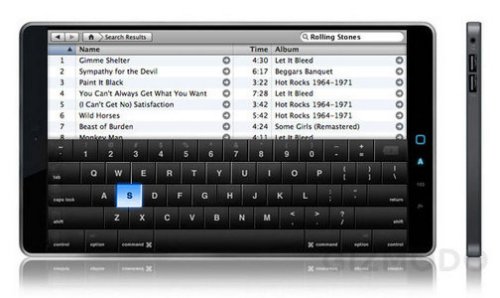
A Taiwanese News Website Recently Posted information which left us no Reason to believe that Apple’s Tablet PC won’t be out by next February. 

According to the Sources, it is confirmed that Taiwanese Manufacturers have Tapped the Supply for Computer Parts for the Most Rumored, Apple’s Tablet.

Simplo Technology Co., Ltd., DynaPack International Technology Corp have been assigned the job of supplying 300,000 long lasting Battery Packs (Woo! That’s a real big number!) for their Tablet Pc.

Next, Wanshih Electronic Co., Ltd. which is a supplier of PC mini coaxial cables situated in Taiwan has grabbed the offer for Apple’s mini coaxial cables order (about 70%).

Apart from that, Taiwan’s  Mag. Layers Scientific-Technics Co., Ltd. and Wintek Corp will supply Power Chokes and Touch Panels (Same which were supplied for iPhone’s) Respectively to Apple.

tablet pc

So from all this Features we can make up for the Tablet PC are -

  • A 9.6 Inch Screen
  • Multi Touch User Interface
  • Built-in HSPDA (high speed download packet access) module
  • A Long Lasting battery pack

Prices can be around $1000 Range. But, under Mass Production the prices may go a further drop as of what we assume now. Apart from that, it is also being stated that this Tablet will be coming in Hands of AT&T and not Verizon. Ha.

Now, after this if someone tells you that the Apple Tablet Rumor is fake, will you believe it?

How Apple Tries to Profit by Not Adding Camera to iPod Touch!
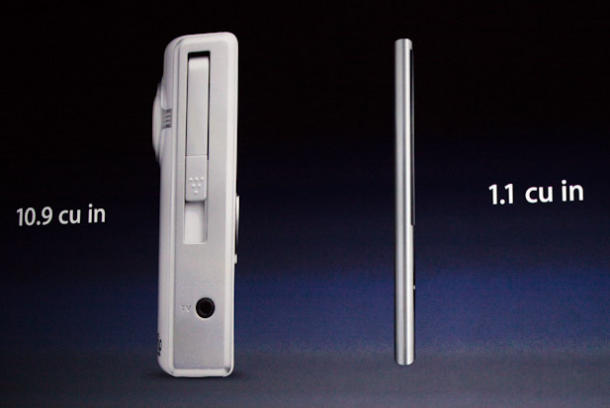
Recently at Apple’s Music Event, they decided to add Camera to iPod Nano and not to iPod Touch. Especially at the KeyNote Direct attack at Flip Video was their plan which was made public by Steve Jobs!

NanoFlipVideo_610x408

Anyways, Well Most Rumors all over the web were about iPod Touch Getting a Camera. It Didn’t. Actually some of iPod Case Manufacturers released the iPod Touch cases on their websites too. But Unfortunately, it was a waste attempt. (Your Really Dum, if you actually ordered it Before!)

But What could be the Reason why it didn’t add Camera to iPod Nano and not to iPod Touch? Well then, wouldn’t a iPod touch Buyer make a fool out of himself when he would spend $199 for it when he could get a iPod Nano having the Same Storage for $149 but along with a camera? (Prices Mentioned here – iPod Touch and iPod Nano)

 iPod : No.1 Music Player in the Worl

But i don’t think this is what Apple Actually thinks. There’s quite a big reason after that step. No.1 That anyone could make out that they obviously want to sell out more iPods. It wouldn’t be boastful but yes, iPods are most sold music players all over the world. And when there’s a new Model, i think atleast 50% of existing customers opt for new models.

Now if we check out our Calender, Christmas is not Much Far and as far as surveys are concerned they state that most of the Sale take place during Christmas, so if Apple Manages to sell out large number of iPod Touch Models this Christmas and later if they make additions to iPod Touch then they could surely make much.. i mean much more Revenue then they could if they would have released it now.

Many More Reasons could be behind this. But the Fact is that, it’s not even 100% Confirmed Wether we are actually going to have iPod Touch with Camera in Future or not but since iPod Nano’s got one, iTouch Must get one.

Search Subtitles for Movies Quickly and Easily – Sublight
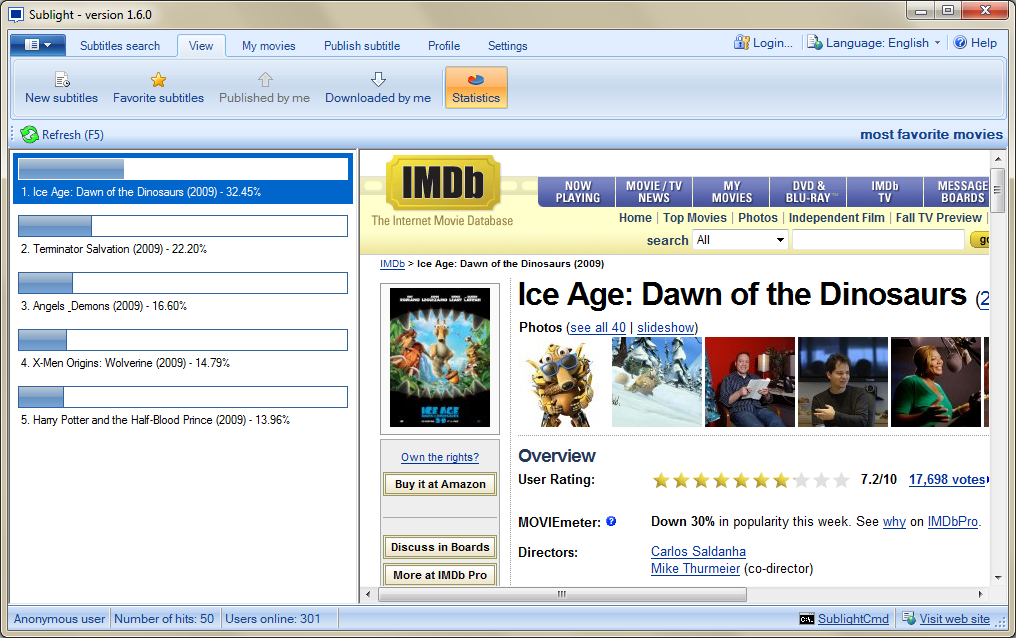
Everyone loves to watch movies on their regional language because they are well familiar with that language and will be enjoying it. but sometimes the movie may not be available in regional language, so the only option left is downloading a subtitle for that movie in your language. So , this post deals about how to search and download subtitles for movies quickly and easily.

Sublight is a windows freeware application with nice user interface which allows you to download subtitles for your movies easily and quickly. It can be used by inexperienced and experienced users. Application is currently translated in ten languages (Arabic, English, French, German, Macedonian, Norwegian, Portuguese [Brazil], Serbian, Slovenian and Spanish) and supports 46 subtitle languages.

Features of Sublight -

1. Auto & manual subtitle search along with subtitle ratings and commenting

2. Preview subtitle before download,

3. Windows Explorer integration (optional),

4. Video playback for downloaded subtitles (with just one double click),

5. Auto update capability,

6. Plugin framework for searching subtitles from other sources (plugin for Podnapisi.NET database is included),

7. Support for OpenSubtitles.org and Podnapisi.NET database.

We also have sublight cmd and sublight server, Where Sublight cmd mainly used by experienced users to download subtitles for all movies at once (batch subtitle download). and Sublight Server very important component because it allows subtitle sharing via its web service API.

20090905_Sublight160

Sublight for WindowsDownload | Homepage | Screenshots

Just try yourself and leave your comments (-:

Download Videos and Extract Audio’s at One Click From YouTube – YouTubeFisher

There are many tools around the web for YouTube (King of Video sharing sites) like YouTube downloader, etc .. But Today we are going to see a simple yet powerful tool for YouTube users where you can download your YouTube videos plus you can also Extract the Audio track quickly and easily.

youtubeFisher2

YouTubeFisher is useful tool which is not just a YouTube video downloader but with a special feature of extracting and saving your audio track from any YouTube video. If you don’t want to download the entire video where you can download only the audio track using YouTubeFisher.

youtubeFisher

How to Use YouTubeFisher ?

1. Download YouTubeFisher (19kb)

2. Open the app and Type the YouTube video url. (Eg :http://www.youtube.com/watch?v=tNE3l2LPiEY)

3. You have 2 options – Download Video and Download Audio -

4. YouTubeFisher retrieves the video or audio and saves it in the format you choose -

5. You can save video file as Mp4, flv, 3gp or audio track from YouTube link.

YouTubeFisherHomepage | Download

Just try once and leave your comments (-:

5 things to do before starting any Project : Learning from My mistakes

My First Project and my last Project has a vast difference. It’s Obvious. But i don’t want my readers to go through the same, but get the best one at the first shot. After all there is a saying 

Fools Learn from Mistakes. Sages Learn from History

In accordance with that i am going to tell you 5 things to keep in mind before starting any Project and it will surely help you.

  1. Resource Management:  It’s Damn Important to first figure out what resources will be needed for your work. May it be Time, Money or Hard, it must be calculated. If not, then your project will become a Unsolved Jigsaw Puzzle where you are trying to fit in pieces from some other puzzle. You must know how much hard work, time and money you are to spend on your project. Only then you can go ahead with it Systematically.
  2. Planning Execution  : Next what comes in is Planning the Execution. As per my post on Marketing on my Blog Blannk, i claim Execution as the third and the most important part that comes in any action plan. If you get that right, nearly 50% of your project is a hit. But you need to be very careful with this one. It should be controlled and most important, targeted. If it’s not Targeted then it makes no difference then teaching a Window Cleaner to do Programming. 
  3. How will it Affect you : Advantages/Disadvantages are must to calculate. Think about it, without any bias. Just enlist what harm or benefit will it do to you. Then Decide which of the two over power each other. And then what? It’s simple. Go ahead with the better plan. For Example – I am a Chief Minister and i have got Two Plans To approve : Metro Development and Sea Link Development and i have Funds to Support any one only then which one will i go for?

    Plan Selection

    (Criteria) Metro Sea Link
    Commoner Benefit Yes No - Beneficial to people with cars
    Completion Time 2-5 Years 1 to 3 Years
    Labour Involvement High Less Compared to Metro
    Environmental effect Eco-Friendly Not Eco-Friendly
    Maintenance Costs High Low Compared to Metro
    Over All Effect 1+1-1+1-1 -1+1-1-1-1
    Sum Total 1 -3

  4. What Reaction You Expect : It’s Always very Good to just enlist what types of Reactions you expect from the Community towards your project, it always helps. Let’s Say for Example i am working on a Music Portal : It will be always good for me to imagine myself as the user himself and then work on the plan. It will help us give a better understanding as to how much the project will work out. 
  5. Never Ever Rush up things : Most Important off all. Always Maintain your Calm and work out the project peacefully. The thing is that as soon as you start rushing up things, your concentration is shattered. You may even try to finish multiple things together but never works out because we are not Windows, we can Minimize our Tasks ;)  
  6. Bonus Tip : You don’t know? You get a Bonus Tip free with the above one!
    Knowing your Limits :  Well Quotes which tell you that man has no limits are good untill put into practice. It’s Quite True that everyone has limits and it’s very important to judge them before putting anyone to work. You must judge out your’s and others capacity to work before putting anyone to work. You ask someone to the work of a Editor when he himself can’t complete his job of being an author! Now you only tell, someone who can’t manage his own content and thoughts, how til he manage others?

Well i think that’s enough from my side. Any FeedBack, Suggestions, Tips from your side welcomed in the Comments :)